file searched end to end¹
THE NEXT-GENERATION TEXT WORKBENCH · AVAILABLE IN THE US
ZapPad
Native Mac text editor and large-log viewer
ZapPad is a native macOS text editor and log file viewer for Apple Silicon. Edit everyday text up to 16 MiB with PCRE2 regex search, column and multiple-cursor editing, reusable macros, CSV/TSV tools, JSON formatting and offline Markdown preview. Investigate multi-gigabyte UTF-8 logs in a separate bounded-memory, read-only viewer with literal search. Review local transformations before applying them. ZapPad is offered to US customers only and requires macOS 12 or later. Download starts an automatic 14-day trial with no email or card. Direct plans are $29.99 per year or $2.99 per month ($35.88 over twelve paid months); both renew until canceled.
Edit everyday text, search with PCRE2 regex, clean CSV and JSON while preserving values, and replay saved macros. For multi-gigabyte UTF-8 logs, ZapPad provides a bounded-memory, read-only viewer with literal search. Review local transformations before applying them.
- Huge-file investigation with bounded-memory Rust processing
- AI generates the transformation; your full file stays out of its context
- Review once. Replay locally. Keep a recovery path.
Native Mac interface · Rust processing core · On-device intelligence
Currently offered to US customers only. Apple Silicon (M1+) · macOS 12+. AI features require macOS 26 or later. Automatic 14-day trial, no email or card required.
Some newer features are unavailable on older versions of macOS. On-device AI requires macOS 26 or later with Apple Intelligence enabled and available. Update to the latest compatible macOS release for the full supported feature set; standard editing and manual tools work on macOS 12 or later.
Pricing $29.99/year Annual or $2.99/month ($35.88 over 12 paid months), renewing until canceled

- Availability
- US customers only
- Annual license
- $29.99/year until canceled
- Monthly license
- $2.99/month · $35.88/12 paid months
- Literal search
- 4 GiB · 286 ms M4 benchmark conditions
median warm literal search¹
blank-editor launch footprint³
p95 launch-to-ready snapshot²
Apple M4 development measurements. Search, startup and editor memory are separate tests. About 53 MiB is the blank editor’s launch footprint; open files, previews and AI add memory. See conditions ↓
WHAT MAKES THIS A DIFFERENT KIND OF EDITOR
A Mac text editor for repeatable cleanup workflows
Finding the pattern is only the beginning. Turn intent into a reviewed operation, run it locally, and reuse it across the work that keeps coming back.
01 / CAPTURE → ACTIONA scratchpad that
Know the result.
One escaped payload.
The runbook. The notes.
A scratchpad that
finishes the job.
You copied a payload to investigate it. Now you’re switching between windows just to make it useful.
Summon ZapPad. Paste. Inspect the structure, transform the text and review the result. Keep the draft locally and dismiss when you’re done.
Capture. Transform. Continue.Global capture + persistent drafts + precision editing 02 / INTENT → AUTOMATIONKnow the result.
Generate the pattern.
“Mask the middle of each email. Keep the first character and the domain.” You know the rule. Start there.
On-device Apple Intelligence proposes a typed regex or supported macro. Inspect and test the plan, save it, then replay locally without another model call.
Your file ≠ the promptBounded instructions + optional examplesLocal model required · generated plans still need review 03 / MESSY DATA → REUSABLE FIXOne escaped payload.
A whole cleanup workflow.
String-wrapped JSON. Quoted commas. IDs with leading zeros. Formatting must respect the actual data.
Decode and validate JSON, work with CSV fields, compare structure and save supported cleanup steps. Preview folder changes with original-file backups.
Decode → inspect → reuseJSON / CSV / TSV + structured comparison + macrosBounded edit operations · huge-file investigation uses a separate read-only viewer 04 / SOURCE → DOCUMENTThe runbook. The notes.
The same workbench.
You’re fixing the data and documenting the finding. The work crosses file types.
Preview GitHub-style Markdown locally. Read headings, checklists and tables while keeping your source intact.
Plain text → readable outputOffline Markdown previewOn-demand preview · no resource downloadsThe advantage is how the pieces work together. Capture → inspect → transform → compare → save → replay. Precise editor controls, bounded-memory investigation and reviewable automation support the same job from first paste to next week’s files.
Explore a practical exampleNATIVE INTERFACE. RUST PROCESSING CORE.
Built-in Rust processing for huge UTF-8 logs
The native Swift / AppKit editor stays focused on interaction. A bundled Rust core handles large-file paging and streaming literal search through a narrow C interface, with bounded buffers and cancellation. No resident processing threads, startup file index or separately installed Rust runtime.
- Rust static library
- 256 KiB default chunks
- Cross-chunk matches
- Cancellable scanning
Built for speed and controlled memory on the measured workloads. Regex uses PCRE2; editor commands, persistence and AI orchestration have their own modules. Rust is not a claim that every operation is faster on every file.
LEAVE MANUAL TEXT WORK IN THE PAST.
Find and change text with precise editing tools
You’re here to find the broken request, clean the export, compare the config, and ship the fix. ZapPad brings a power editor’s precision to the repetitive work between you and done.
THE TOOLS YOU REACH FOR EVERY DAY
Precision editing, PCRE2 search, and Mac text tools
Fixed-width records. Repeated identifiers. Logs full of noise. Work directly with the text, or build a transformation you can inspect and repeat.
01 / COLUMN EDITING + MULTIPLE CURSORS
Change the column.
Keep the rest intact.
Select a rectangular block in a fixed-width export, or place multiple selections where the same edit belongs. Change a region code without touching the account IDs or decimal values beside it.
REGION ACCOUNT AMOUNT
NYC 00142 001.2300
NYC 00143 002.5000
NYC 00144 003.7500
Select the first 3 columns → type
ORD- Option + drag
- OptionShift + arrows
Column selection is positional. Use CSV tools for quoted or variable-width fields. Column/multiple-selection editing is available; portable macro recording of those interactions is not fully supported.
02 / PCRE2 SEARCH + TRANSFORMATION
PCRE2 regex search, replacement, and line extraction.
Use numbered or named captures, Unicode properties and regex replacements. Extract matches, keep or delete matching lines, or copy matching lines into a new workflow without changing the source.
MATCH
\bINV-(?<id>\d{4})\bREPLACEORDER-${id}INV-1042 amount=001.2300 ORDER-1042 amount=001.2300
- Named captures
- Unicode properties
- Keep / delete / extract
Illustrative pattern and result. PCRE2 enforces match, depth and heap limits; replacements are validated against capture groups. Conventional regex tools work without model inference.
YOUR EVERYDAY, UPGRADED
Preview and replay repeatable text transformations
Pick a real-world task. See exactly what changes.
These interactive examples run in your browser; they don’t call AI.
Instruction Trim each line, remove duplicates, and sort the IDs. Illustrative preview
Input4 records
  ACC-1042
ACC-1007
  ACC-1042
ACC-1013
Expected result3 unique IDs
ACC-1007
ACC-1013
ACC-1042
Keep one clean list. Save the reviewed steps as a macro and reuse them on the next export. Trim → deduplicate → sort
Instruction Replace the first three character columns with ORD. Keep the IDs and amounts unchanged. Illustrative preview
Input3 fixed-width records
NYC  00142  001.2300
NYC  00143  002.5000
NYC  00144  003.7500
Expected result3 region cells edited
ORD  00142  001.2300
ORD  00143  002.5000
ORD  00144  003.7500
In the editor, use rectangular selection for positional edits. Use structured CSV tools when fields have variable width or quoted delimiters. Column select → replace selected text
Instruction Rename INV- identifiers using a named capture. Leave the written amounts intact. Illustrative preview
Input2 invoice records
INV-1042 amount=001.2300
INV-1043 amount=002.5000
Expected result2 identifiers renamed
ORDER-1042 amount=001.2300
ORDER-1043 amount=002.5000
Illustrative PCRE2 match: \bINV-(?<id>\d{4})\b · replacement: ORDER-${id}. Compile and inspect the result before applying. Named capture → validated replacement
Instruction Convert DD/MM/YYYY dates to YYYY-MM-DD. Leave the ticket IDs alone. Illustrative preview
Input2 ticket records
TICKET-1042 · 09/10/2026
TICKET-1007 · 31/12/2025
Expected result2 date formats changed
TICKET-1042 · 2026-10-09
TICKET-1007 · 2025-12-31
Review the generated pattern and replacement before applying. A valid regex still needs to match your intent. Capture day/month/year → reorder groups
Instruction Find the configuration changes behind a sudden timeout spike. Illustrative preview
InputBefore deployment
TIMEOUT_SECONDS=30
RETRY_LIMIT=3
LOG_LEVEL=info
Expected result3 settings changed
TIMEOUT_SECONDS=5
RETRY_LIMIT=0
LOG_LEVEL=debug
Compare two open pads, including unsaved text. Use side-by-side or unified diff views to inspect the changes. Compare → inspect → copy unified diff
In ZapPad, a short instruction can propose a regex or supported macro. You review and test the plan before applying it. The examples above are fixed illustrations, not a browser-based editor. Model output can be wrong; preview remains essential.
01 / FOR THE “WHY DID PRODUCTION FAIL?” MOMENT
Search huge log files on Mac without loading the whole file
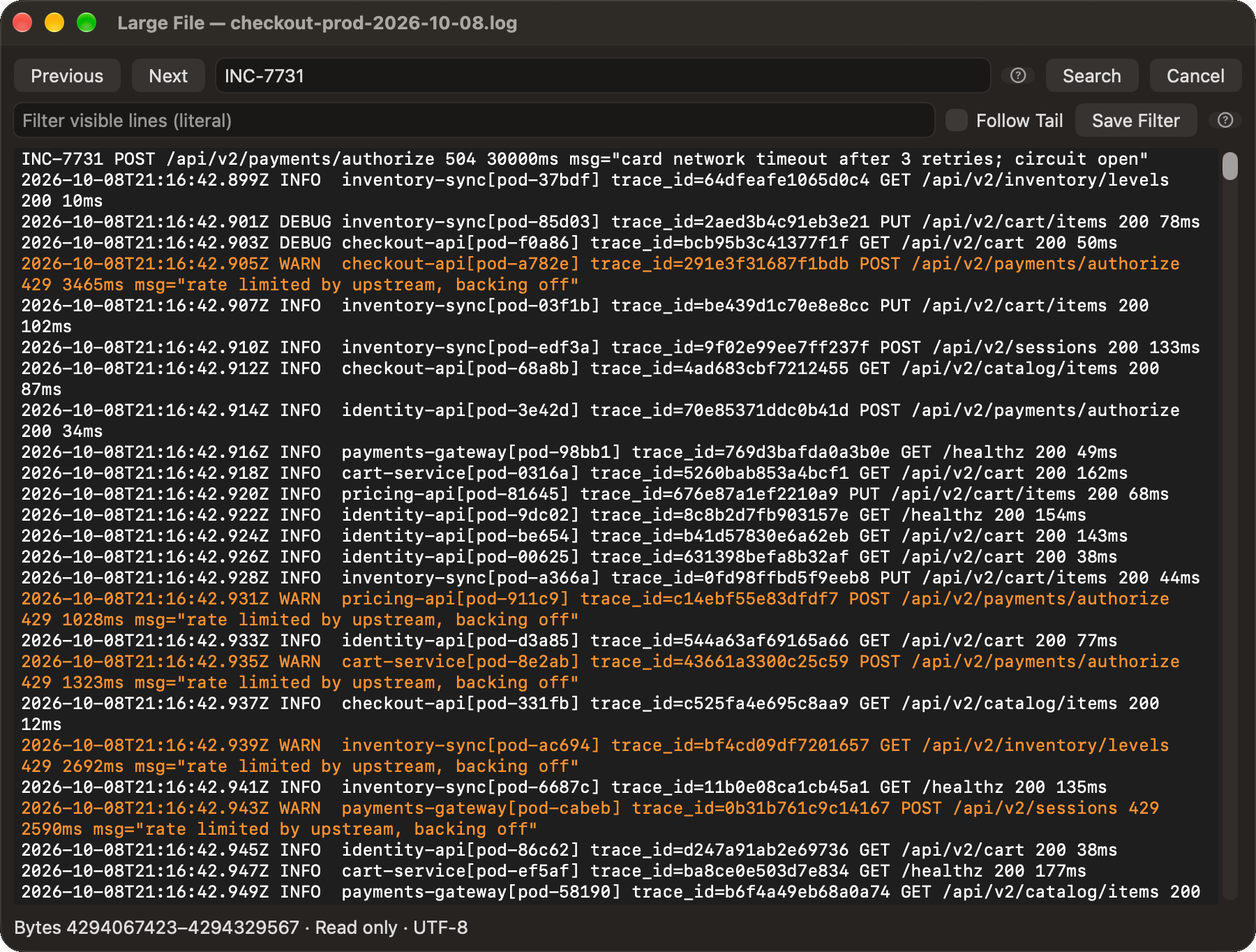
A checkout request timed out. Somewhere in a huge log is INC-7731. Search the literal ID, jump to the hit, and read the surrounding warnings, without turning the whole file into an in-memory document.
256 KiBdefault viewer page4 GiBtested file size
Large-file browsing is read-only. Ordinary edit mode currently supports files up to 16 MiB. Huge-file editing is not a shipping claim.
02 / FOR THE “I KNOW WHAT I WANT, NOT THE REGEX” MOMENT
Describe the edit.
Inspect the pattern.
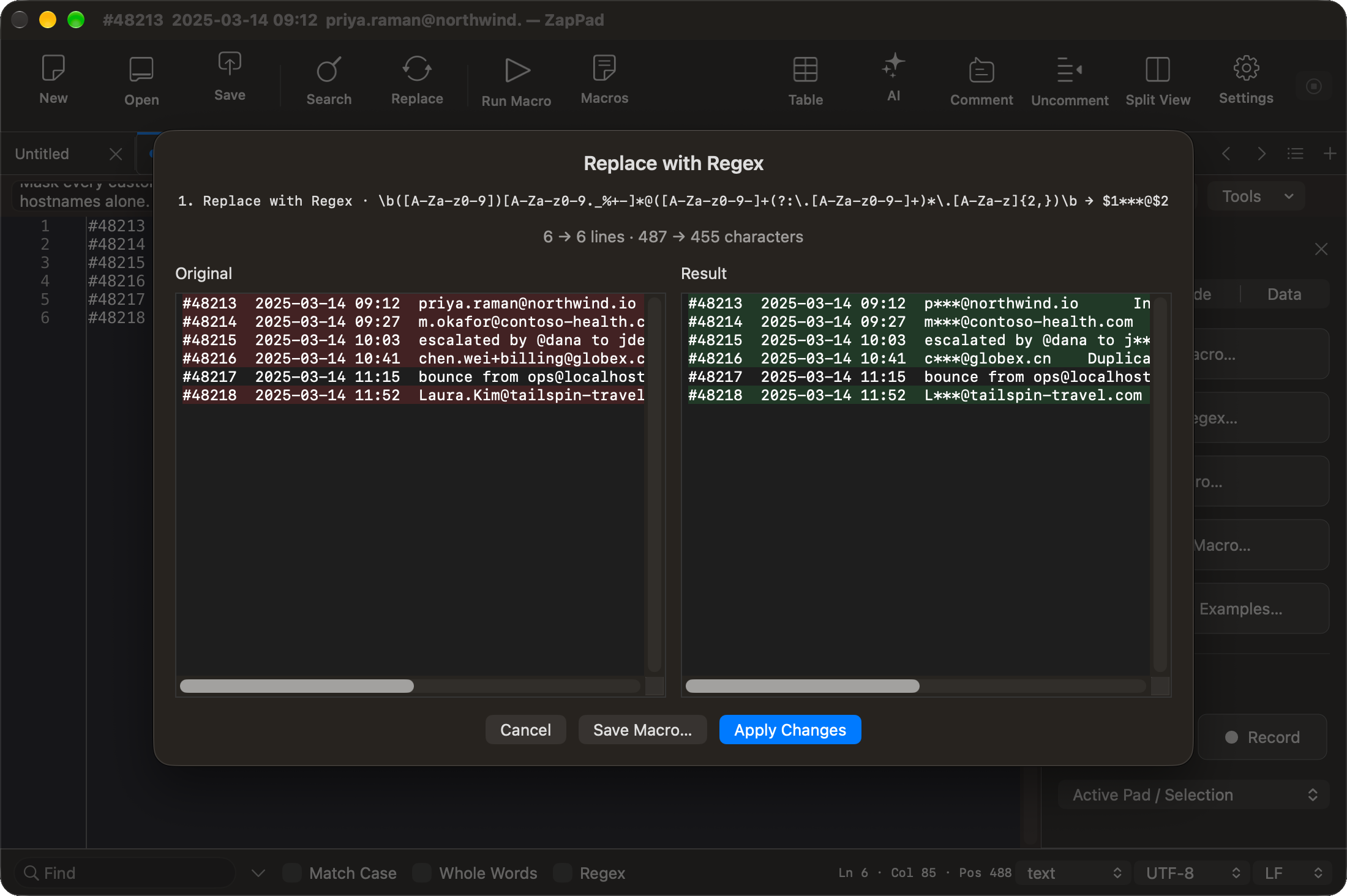
“Mask the middle of each email address. Keep the first character and the domain.” Apple’s on-device Foundation Models can turn short instructions into a typed transformation. ZapPad compiles and validates supported operations, then shows the result for review.
Describe→Validate→Preview→ApplyYour full file stays out of the model context. Generation uses bounded instructions and optional examples; availability depends on the Mac’s local model. No cloud fallback in the current build.
03 / FOR YOUR NEXT FRIDAY EXPORT
0new model calls on deterministic replayTeach it once.
Get your Fridays back.
Trim, deduplicate, sort. Save the reviewed steps as a macro and run them on next week’s data. Record supported editing commands or save a generated transformation; replay executes locally.
25,000complex Unicode lines in tests100prior saved macro versions retained
04 / FOR THE CHANGE THAT TOUCHES EVERY CONFIG
200files in the supplied endpoint-change demoReview the batch.
Keep the originals.
Change old-api.example.com/v1 across a project folder. Filter file types, exclude node_modulesreview before/after text, then apply. Original bytes are backed up before writes; recovery refuses to overwrite later external edits.
05 / FOR THE CONFIG THAT “DIDN’T CHANGE”
Two open pads.
One clear answer.
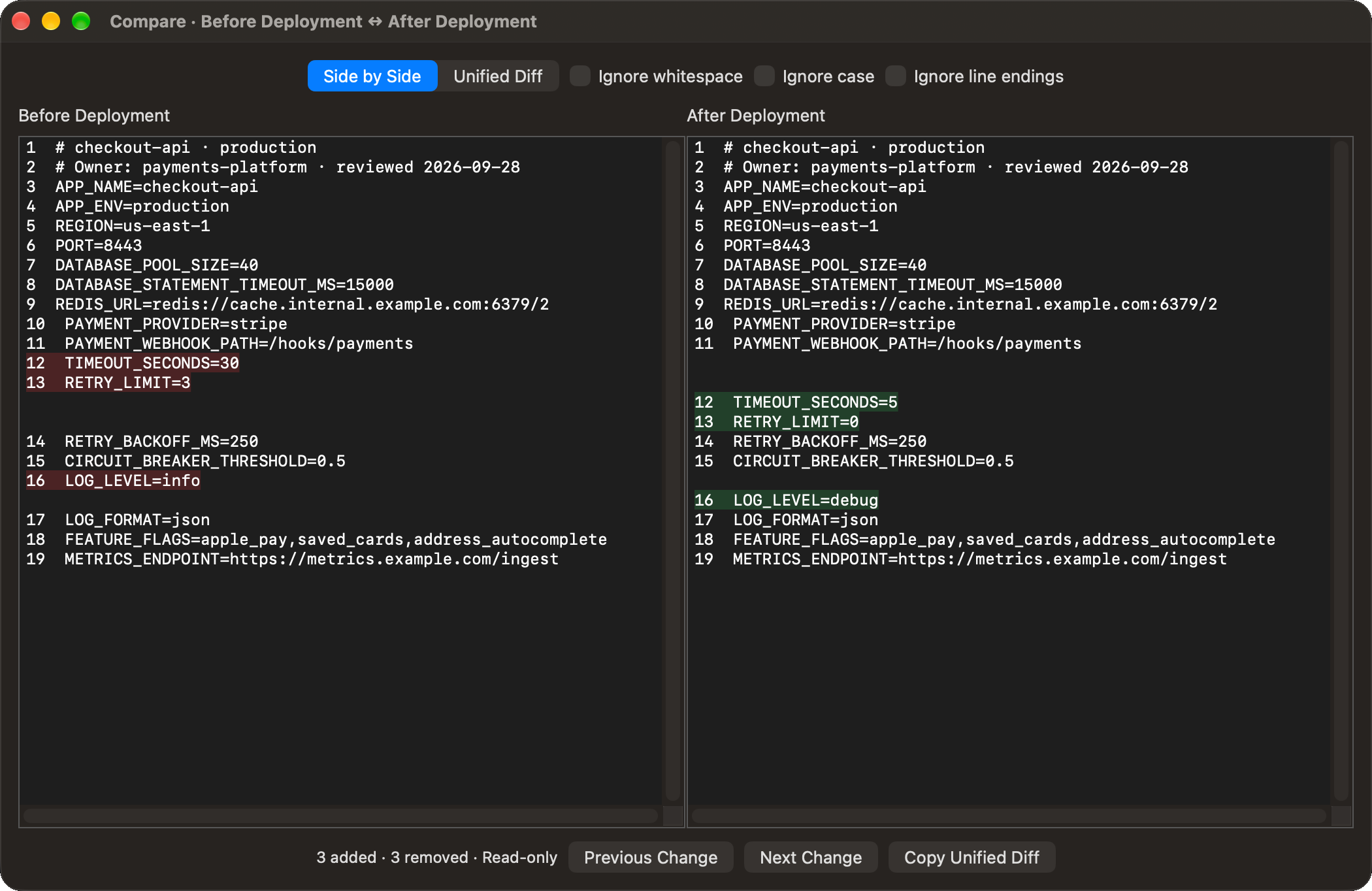
Your timeout was 30 seconds. Now it’s 5. Compare two open tabs, even unsaved ones, in side-by-side or unified diff views. Ignore whitespace, case or line endings when they’re noise. Copy the unified diff to share what changed.
− TIMEOUT_SECONDS=30+ TIMEOUT_SECONDS=5Comparison uses read-only snapshots. Whitespace-ignore removes spaces/tabs; it is not only a trailing-space rule. It does not merge, stage Git changes or rewrite either document.
FOR THE EXPORT THAT MUST STAY EXACT
Clean CSV and JSON without losing IDs or numeric precision
Account IDs with leading zeros. Numbers beyond JavaScript’s safe-integer range. Quoted commas. These are your data, not formatting mistakes.
9007199254740993
stays 9007199254740993.
{
"id": 9007199254740993,
"rate": 1.2300
}
Validate and format strict JSON while preserving object key order and the written numeric tokens. Formatting does not round an integer or rewrite a trailing-zero representation.
Illustrative input values, not a numeric-computation claim.Work with fields, not comma guesses.
Respect quoted delimiters, embedded newlines, empty cells and Unicode. Extract columns, filter rows, group records, or convert between CSV, TSV and JSON. CSV-to-JSON preserves fields as strings, including IDs such as 00142.
Format for the dialect you use.
Choose generic SQL, PostgreSQL, MySQL, SQLite or T-SQL. Formatting runs locally through a bundled formatter loaded on demand. It changes layout; it does not execute queries or establish SQL correctness.
Compare the data behind the text.
Compare JSON while ignoring object-key order, or match CSV rows by a selected key column. Array order remains meaningful; duplicate keys are rejected when they make the comparison ambiguous.
JSON/CSV/TSV paste suggestions offer relevant preview tools locally, without AI. They do not silently convert your clipboard. SQL formatting has a separate 1 MB input limit.
FOR WORK YOU CAN’T AFFORD TO RECREATE
Recover text with local drafts, revisions, and backups
A fast edit is only useful when you can trust what happened to the file. Review the scope, retain the originals, and make failures visible.
Drafts and revisions
Drafts persist asynchronously to local SQLite storage. Reopen committed content, inspect document revisions and recover archived pads. Named files stay in their original locations.
Conflict-aware saves
Coordinated atomic writes and file-fingerprint checks detect outside edits before overwriting. Choose how to resolve the conflict instead of silently discarding someone else’s changes.
Preview multi-file changes before applying them
Folder transformations show before/after previews and back up originals before source writes begin. Unreadable traversal fails the preview instead of presenting incomplete results as success.
Recoverable interruption
Batch recovery keeps a manifest of originals and expected replacements. It refuses to overwrite files edited after the batch. Saved macros also retain up to 100 prior versions for restoration.
In one recorded interruption test, the writer was forcibly stopped after 8 files changed. Recovery restored all 400 originals byte-for-byte. Separate source-disk and recovery-disk ENOSPC tests passed on a disposable 32 MB volume.
Recovery restores committed drafts and retained backups, not uncommitted keystrokes. Batch replacement is not an all-or-nothing filesystem transaction: partial failure can require recovery. Text undo does not currently cover colored annotations. These tests are not power-loss or security-scoped bookmark revocation certification.
WHEN BYTES AND POSITIONS MATTER
Inspect text encoding, line endings, and character positions
Make the interpretation explicit before a file travels between macOS, Windows, scripts and legacy systems.
- Encoding
- UTF-8, UTF-8 BOM, BOM-marked UTF-16 LE/BE, Windows-1252, ISO-8859-1, Mac Roman and Shift-JIS. Choose legacy interpretation explicitly; unrepresentable writes reject rather than silently replacing characters.
- Line endings
- Inspect and explicitly convert LF, CRLF or CR. Show whitespace and line endings when invisible differences matter.
- Positions
- Live line, column, cursor, anchor and selection-range information. UTF-16 offsets are code-unit positions, not always visible-character counts.
- Inspection
- Text statistics, Unicode inspection and SHA-256 hashing help investigate content and identity. A hash is not a substitute for a comparison or a backup.
THE ZAPPAD FIELD GUIDE
ZapPad demos: full tour and focused workflow videos
Watch the complete ZapPad tour, then choose a focused walkthrough for the workflow you need.
The embedded player loads only when you choose to play it. YouTube processes playback data under its own privacy policy. Watch on YouTube ↗
Open the dedicated ZapPad Full Tour page

Searching a 4 GiB Log in 286 ms: What We Actually Measured | ZapPad for Mac
A short demonstration and benchmark explanation for searching a 4 GiB synthetic UTF-8 log in ZapPad's separate read-only viewer.
Watch demo on YouTube ↗
Plain-English Regex & Reusable Macros on Mac | ZapPad
A short demonstration of describing text changes in plain English, reviewing the resulting regex and saving supported work as a reusable macro.
Watch demo on YouTube ↗
JSON & CSV on Mac: Keep Every Digit and Leading Zero | ZapPad
A short ZapPad demonstration of formatting JSON without changing large numeric tokens and working with CSV fields while keeping leading zeros.
Watch demo on YouTube ↗
Column Editing on Mac: Fix 12 Rows at Once | ZapPad
A short ZapPad demonstration of column editing on a Mac, including applying one positional edit across multiple rows.
Watch demo on YouTube ↗
Edit Repeated Text Safely with Multiple Cursors | ZapPad
A short ZapPad demonstration of selecting repeated values, preserving one occurrence and reviewing a multi-cursor edit.
Watch demo on YouTube ↗Focused demos link to currently public ZapPad videos. Synthetic example data is used where shown.
START WITH THE TASK
Mac text editing guides for real workflows.
Compare the right workflow, see the relevant demonstration, and check the limits before choosing a tool.
Looking for Notepad++ on Mac?
Compare a native macOS editor workflow with the official Notepad++ download options.
Read the Mac guide →Open a large log file on Mac
Learn when a read-only, paged viewer is safer than loading the whole file into an editor.
See the log workflow →Compare BBEdit and ZapPad
Review each editor’s strengths, supported workflows, platform needs, and large-file limits.
Read the comparison →Turn a plain-English edit into regex
See how ZapPad proposes, validates, and previews supported local transformations.
See the regex workflow →Keep CSV and JSON values exact
Understand how formatting can preserve large IDs, leading zeros, and written number tokens.
See the data workflow →SOURCE FIRST. READABLE WHEN YOU NEED IT.
Preview Markdown runbooks on Mac without changing source
Keep writing plain text. Open a rendered snapshot when structure matters. The preview loads on demand and does not send your document to an AI model.
MARKDOWN / OFFLINE GFM PREVIEW
Read the runbook.
Keep the source.
Open a .md file or paste recognizable Markdown. Preview headings, task lists, fenced code and GitHub-style tables in a separate reading window. Ambiguous text offers a hint; the language selector gives you the final say.
# Checkout incident
- [x] Find the failing request
- [ ] Compare the configuration
| Service | State |
| --- | --- |
| checkout-api | investigating |
- GFM tables
- Task lists
- Manual override
- Light / dark
Bundled Marked parser → offline WKWebView snapshot. Up to 512 KiB source; preview a selection from larger pads. Raw HTML stays text, links are inert and images become alt-text placeholders. No remote resources or page JavaScript. Re-preview to refresh; the source is unchanged.
ENGINEERING, WITH THE RECEIPTS
ZapPad performance measurements and benchmark conditions
Professional tools deserve precise claims.
Here’s what the development measurements actually say.
286 ms median
Across a 4,294,967,316-byte synthetic file with the marker at the far end. Three measured runs: 286, 524 and 283 ms. Peak process RSS: 6,504,448 bytes (6.20 MiB / 6.50 MB).
¹ Release command-line benchmark on Apple M4, warm filesystem caches, October 9, 2026. Bounded 256 KiB chunks. Not file-open time, full-app RAM usage, cold-disk performance, regex throughput or an M1 result.
364 ms p95
30 fresh-process launches in an earlier development snapshot on Apple M4 / macOS 27.0.1, measuring process start to editor-ready with warm filesystem caches.
² Not reboot-cold startup, shortcut-to-visible latency or a measurement of the final shipping build. Performance varies by hardware, storage, file content and model availability.
≈53 MiB at launch
About 49 MiB after repeated summon/dismiss. Three fresh processes of the current signed Debug build measured 52.72–52.80 MiB at launch and 48.66–48.77 MiB after 30 command summons each.
³ Apple M4 / macOS 27.0.1, October 17, 2026. App physical footprint, blank editor, warm filesystem caches. Not RSS, a maximum, a large-document workload, total AI-service memory or M1/8 GB acceptance. Documents, web previews and model services add memory.
THE POWER-USER SPEC SHEET
ZapPad features, compatibility, and current limitations
Implemented development capabilities, with the current limits stated alongside them. This is not a promise of full Notepad++ or IDE parity.
Editing, navigation and workspace
- Editing
- Multiple selections, rectangular selection, indentation, comments, sorting, deduplication, case conversion, wrapping, zoom and read-only mode. Ordinary transformations are bounded to 16 MiB input/output.
- Code navigation
- Syntax coloring, folding, bookmarks, colored marks, document map, function/heading outlines, word/path completion, pairing and custom profiles backed by bundled lexers. Several languages share lexical rules; this is not compiler-backed semantic analysis or LSP support.
- Workspace
- Quick capture, tabs, saved view sessions, snippets/templates, light/dark themes and configurable shortcuts. Split/cloned views share the same document. The separate two-document comparison window uses read-only snapshots.
Regex, macros and generation
- PCRE2
- UTF/Unicode-property matching, named/numbered captures and capture-aware replacement validation. Patterns are capped at 16 KiB; collected matches at 100,000. Resource-limit errors stop processing.
- Macros
- Supported recorded actions, inspectable steps, save/import/export, shortcuts, count/end replay and local deterministic execution. Up to 100 prior saved versions retained. Mouse navigation and column/multiple-selection interactions are not fully portable recordings; parameterized macros and a general step editor remain unfinished.
- Local AI
- Bounded instructions/examples propose supported operations. Compile and validate, run a temporary preview, then apply after review; stale previews are rejected. Review and test generated plans; free-form model output can be wrong. No full-document inference or cloud fallback in this build.
Large files, comparisons and structured tools
- Large files
- Rust-backed read-only UTF-8 paging and case-sensitive literal search, with a 256 KiB default page. Follow Tail refreshes the last page; viewer filters apply to the current page, not the entire file. Multi-gigabyte regex/macro editing is not implemented.
- Text comparison
- Side-by-side alignment, unified diff, change navigation and optional whitespace/case/EOL ignoring. Limits: 16 MiB combined input, 100,000 lines per file and a bounded comparison-work budget. No staging, commits, branch operations or three-way merge.
- Data tools
- Strict token-preserving JSON; bundled SQL formatting; quoted CSV/TSV parsing; conversion, extraction, filtering, grouping and structured comparison. Explicit input/cell limits apply. JSON formatting is not a JSON query engine.
Rust core and Markdown
- Rust boundary
- Static Rust library for bounded large-file reads and literal search, called through a narrow C ABI. Supports cross-chunk and overlapping matches, byte offsets beyond 4 GiB and cancellation. Ordinary regex is PCRE2, not the streaming literal-search engine. A tested separate-file replacement primitive is not advertised as a complete huge-file macro workflow.
- Markdown
- Bundled Marked 18.1.1, parsed off the UI thread; nonpersistent WKWebView created on demand. Detection examines 8 KiB; preview accepts 512 KiB input and at most 8 MiB rendered body. Selected-text or whole-pad snapshots. No Mermaid, math rendering, live source synchronization or code-language highlighting in the preview.
- Verification
- Targeted Markdown rendering and core checks are available. M1/8 GB acceptance remains an open development gate.
Platform, privacy and verification
Current target: macOS 12 or later on Apple Silicon. AI features require macOS 26 or later with Apple Intelligence available on the device; conventional tools remain usable without inference. Drafts and transformations stay local. The page’s benchmarks come from specific M4 development snapshots. M1/8 GB acceptance, physical accessibility/input-method checks and real security-scoped bookmark expiration/revocation are still open gates. ZapPad Direct is available to US customers; the limitations above remain applicable.
ANNUAL OR MONTHLY LICENSE
ZapPad Annual and Monthly subscription pricing
Currently offered to US customers only. Download ZapPad to begin your automatic 14-day free trial, or purchase a license below.
Annual license
$29.99 USD/year, renewing until canceled
Each confirmed Annual payment includes twelve calendar months of updates for its paid period. Renews automatically each year until canceled. Cancel before the next renewal to stop the next charge. We will notify you before any renewal price increase.
Monthly license
$2.99 USD/month · $35.88 over 12 paid months
Renews monthly until canceled. Cancel anytime: future charges stop with no remaining balance owed. Before twelve confirmed paid months, access ends with the current paid month.
Both schedules provide the same Pro features on up to three activated Macs. An Annual license retains covered builds after its update year ends. Monthly qualifies for completed-year build access after twelve distinct confirmed paid periods; that cutoff is frozen at the end of the twelfth confirmed period. Later builds need additional coverage. A disabled or refunded license revokes affected coverage. Trial days and unconfirmed months do not count.
The separate fourteen-day Direct app trial starts automatically on each Mac when its signed trial is first issued. No email, signup or card is required. Connect once to start, then work offline until expiry. Reinstalling a recognized Mac returns its original expiry. Trial expiry does not start paid billing.
Requires Apple Silicon (M1 or later) and macOS 12 or later. Prices are USD; Direct checkout will show the applicable tax-inclusive total before payment. App Store distribution remains a separate, paused release. License terms · Privacy policy · Licensing help
Annual subscriptions renew at $29.99 USD/year and Monthly subscriptions at $2.99 USD/month ($35.88 over twelve paid months), until canceled. We will notify you before any renewal price increase and obtain any consent required by applicable law. To disable automatic billing, open Manage Billing / Cancel Renewal, sign in with your purchase email, select your subscription and cancel before its renewal date. Cancellation stops future charges; the current paid period and earned covered-build rights remain available under these terms. Deactivating a Mac or deleting ZapPad does not cancel billing. We do not provide prorated refunds for unused time or partial billing periods, except where required by law or Lemon Squeezy's applicable policies. Existing one-time purchases remain one-time and are not automatically enrolled into a subscription. The card-free app trial never starts billing.
BEFORE YOU ASK
ZapPad FAQ: files, features, platform, and pricing
How can I open and search a 4 GB log file on a Mac?
Use ZapPad’s separate large-file viewer to page through a UTF-8 log and search for literal text without loading the entire file into the editor. The viewer is read-only and uses bounded memory. Ordinary editing supports files up to 16 MiB; ZapPad does not claim to edit multi-gigabyte logs.
Does ZapPad support PCRE2 regular expressions on Mac?
Yes. ZapPad uses PCRE2 for search and supported transformations in ordinary documents, including Unicode properties and named or numbered captures. Pattern and match limits apply. The huge-log viewer uses separate literal search, not streaming regex. Inspect and test a preview before applying a replacement.
Does ZapPad preserve large numbers and leading zeros in CSV and JSON?
ZapPad’s JSON formatter preserves written number tokens, object-key order, and written decimal zeros; CSV and TSV tools retain field text such as identifiers with leading zeros. These tools format and transform values but do not perform arbitrary-precision calculations. Review output before saving it.
Does ZapPad send my full document to a cloud AI service?
No. In the current build, the optional planner runs on-device, uses bounded instructions and examples, and proposes supported operations for review. Transformations run locally against your text. There is no cloud AI fallback. Conventional editing, search, data tools, and macros work without the planner.
What Mac do I need, and where can I buy ZapPad?
ZapPad Direct requires Apple Silicon (M1+) and macOS 12+ and is sold to US customers only. Download starts a 14-day trial without email or card. Annual is $29.99/year; Monthly is $2.99/month ($35.88 over twelve paid months). Both renew until canceled; paid-build coverage follows the license terms.

BUILT FOR PEOPLE WHO LIVE IN TEXT.
Download ZapPad for Mac
Try the native Mac text workbench free for 14 days. Currently offered to US customers only.
Download ZapPadRead the user manualApple Silicon (M1+) · macOS 12+. AI features require macOS 26 or later. No signup or card required to start the trial. Questions? hello@evolute-llc.com
